<< < 2 3 4 5 6 7 8 9 > >>   Sort: Date

How To Get Extra Space between Paragraphs
How To Get Extra Space between Paragraphs? - XHTML 1.0 Tutorials - Body Tag and Block Level Tags By default, browsers will give a predefined white space between two paragraphs. But if you want some extra white space between two paragraphs, you can enter an extra paragraph with a &amp;nbsp; entit...
2007-05-12, 5077👍, 0💬

What Is a TR Tag/Element
What Is a TR Tag/Element? - XHTML 1.0 Tutorials - Understanding Tables and Table Cells A "tr" element is a special element that can only be used as a sub-element of a "table" element. A "tr" element defines a row in a table. Here are basic rules about "tr" elements: "tr" elements are special element...
2007-05-11, 5070👍, 0💬

What Are List Elements
What Are List Elements? - XHTML 1.0 Tutorials - Understanding Lists and List Items XHTML 1.0 offers 3 list elements: "ol" - Ordered List: A list of items with leading sequential numbers. "ul" - Unordered List: A list of items with leading bullets. "dl" - Definition List: A list of items with leading...
2007-05-12, 5067👍, 0💬

Hyper Links and Images
Hyper Links and Images - XHTML 1.0 - Interview Questions What is a hyper link? What is a URL? How to included an image in the middle of a sentence? How to place an image to the right side of a paragraph? What is an image map?
2007-05-12, 5064👍, 0💬

Can I Mix Images with Text in a Paragraph
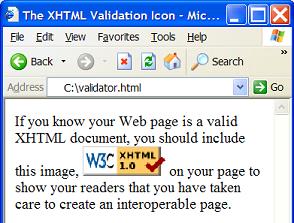
Can I Mix Images with Text in a Paragraph? - XHTML 1.0 Tutorials - Body Tag and Block Level Tags Yes. "img" elements are in-line elements. You can use "img" elements to mix images with text in any paragraph defined by a "p" element'. Below is a good tutorial example of image mixed with text: &lt...
2007-05-12, 5056👍, 0💬

What Is a http-equiv META Tag/Element
What Is a http-equiv META Tag/Element? - XHTML 1.0 Tutorials - Document Structure and Head Level Tags a http-equiv meta element is a special meta element that provides information equivalent to HTTP headers. A http-equiv meta element must include the "http-equiv" attribute as, http-equiv="Content-Ty...
2007-05-12, 5051👍, 0💬

What Is an IMG Tag/Element
What Is an IMG Tag/Element? - XHTML 1.0 Tutorials - Understanding Inline Images and Image Maps A "img" element is an inline element that you can use to define an inline image to be included in a XHTML document. Here are basic rules about an "img" element: "img" elements are inline elements. A "img" ...
2007-05-12, 5050👍, 0💬

What Are the XHTML Elements Defined with Mixed Contents
What Are the XHTML Elements Defined with Mixed Contents? - XHTML Tutorials - Introduction To Element Content Syntax The following XHTML elements are defined to use the mixed content model: &lt;p&gt; - Element to insert a paragraph. &lt;pre&gt; - Element to insert a pre-formatted text...
2007-05-12, 5047👍, 0💬

What Are the XHTML Elements Defined with Sub-elements Contents
What Are the XHTML Elements Defined with Sub-elements Contents? - XHTML Tutorials - Introduction To Element Content Syntax The following XHTML elements are defined to use the sub-element content model: &lt;html&gt; - The root element of the document. &lt;head&gt; - Element to provide...
2007-05-12, 5046👍, 0💬

What is a Smallest Valid XHTML Dodument
What is a Smallest Valid XHTML Dodument? - XHTML 1.0 Tutorials - Document Structure and Head Level Tags If you are interested to see the smallest, but valid, XHTML document, check this one: &lt;?xml version="1.0" ?&gt; &lt;!DOCTYPE html PUBLIC "-//W3C//DTD XHTML 1.0 Strict//EN" "http://w...
2007-05-12, 5043👍, 0💬

How To Reduce the Display Size of an Image
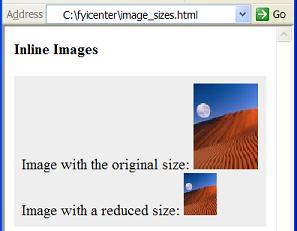
How To Reduce the Display Size of an Image? - XHTML 1.0 Tutorials - Understanding Inline Images and Image Maps If an image embedded inline is too big when displayed in a browser, you can use "width" and "height" attributes to reduce the image's display size. The display width and height should be pr...
2007-05-12, 5042👍, 0💬

What Are the Values Submitted on Radio Button Fields
What Are the Values Submitted on Radio Button Fields? - XHTML 1.0 Tutorials - Understanding Forms and Input Fields A "radio" button input field does not allow viewers to enter any input values directly. If a form is submitted, "radio" button input fields will be submitted with values based on the fo...
2007-05-12, 5037👍, 0💬

What Happens If a URL Starts with Path or File name
What Happens If a URL Starts with Path or File name? - XHTML 1.0 Tutorials - Understanding Hyper Links and URLs If a URL starts with a path name, the browser will borrow the protocol name, the host name, and the port number from the URL of the current document to make up the missing parts. For examp...
2007-05-12, 5035👍, 0💬

How Many Document Types Defined in XHTML 1.0
How Many Document Types Defined in XHTML 1.0? - XHTML 1.0 Tutorials - Document Structure and Head Level Tags There are only 3 document types are defined in XHTML 1.0: 1. Strict type: Only allow non-deprecated and non-frameset XHTML elements in this type. Strict type should be declared as below: &...
2007-05-12, 5024👍, 0💬

What Is CDATA
What Is CDATA? - XHTML Tutorials - Introduction To Element Content Syntax CDATA stands for Character DATA, which is used to define a section of data that should not go through the XHTML entity translation (parsing) process. In other words, 3 special characters: "&lt;", "&gt;", and "&amp;...
2007-05-12, 5022👍, 0💬

What Is the Relation between XHTML and URL
What Is the Relation between XHTML and URL? - XHTML FAQs - Introduction To XHTML 1.0 URL (Uniform Resource Locator) is a compact string representation of the location for a Web document or other resource that is available on the Internet. The URL of an XHTML document is usually the document file nam...
2007-05-12, 5022👍, 0💬

What Is a PRE Tag/Element
What Is a PRE Tag/Element? - XHTML 1.0 Tutorials - Body Tag and Block Level Tags A pre element is a block level element that can be used directly as a sub-element in the body element. You can use pre elements to specify blocks of pre-formatted text with white space characters preserved. Here are bas...
2007-05-12, 5021👍, 0💬

What Is a Required Sub-element
What Is a Required Sub-element? - XHTML Tutorials - Introduction To Element Content Syntax A required sub-element is a sub-element that you must included in the parent element. Most sub-elements are optional. But there are some sub-elements that are required by their parent elements. Here are two go...
2007-05-12, 5015👍, 0💬

What Is a P Tag/Element
What Is a P Tag/Element? - XHTML 1.0 Tutorials - Body Tag and Block Level Tags A p element is a block level element that can be used directly as a sub-element in the body element. You can use p elements to specify paragraphs of text and in-line elements. Here are basic rules about p elements: "p" el...
2007-05-12, 5013👍, 0💬

What Are the XHTML Elements Defined with PCDATA Contents
What Are the XHTML Elements Defined with PCDATA Contents? - XHTML Tutorials - Introduction To Element Content Syntax The following XHTML elements are defined to use the PCDATA content model: &lt;title&gt; - Element to provide a title to the document. &lt;style&gt; - Element to provid...
2007-05-12, 5009👍, 0💬

What Is Wrong with My Body Elements
What Is Wrong with My Body Elements? - XHTML 1.0 Tutorials - Body Tag and Block Level Tags If you are having trouble with your body elements, it could be caused by one of the following common mistakes: &lt;!-- Text can not be used in body directly --&gt; &lt;body&gt; Hello world! &am...
2007-05-12, 5008👍, 0💬

What Tools to Use to Write XHTML Documents
What Tools to Use to Write XHTML Documents? - XHTML FAQs - Introduction To XHTML 1.0 The basic tool you need to write XHTML documents is any text editor, like notepad on Windows system, or vi on Unix system. If you are looking for some advanced tools to help you writing XHTML documents, you can sele...
2007-05-12, 5007👍, 0💬

What Attributes Are Allowed in the Body Element
What Attributes Are Allowed in the Body Element? - XHTML 1.0 Tutorials - Body Tag and Block Level Tags XHTML 1.0 strict version does not allow some attributes that were commonly used in early versions of HTML specification. For example: "background" can be used to specify a background image, and "bg...
2007-05-12, 5003👍, 0💬

Who Developed XHTML
Who Developed XHTML? - XHTML FAQs - Introduction To XHTML 1.0 XHTML was developed by W3C HTML Working Group with Steven Pemberton as the group chair.
2007-05-12, 4995👍, 0💬

<< < 2 3 4 5 6 7 8 9 > >>   Sort: Date