< 1 2 3 4 5 6 7 > >>   Sort: Date

How To Use DIV Elements to Change CSS Properties
How To Use DIV Elements to Change CSS Properties? - XHTML 1.0 Tutorials - Understanding DIV and SPAN elements As elements containers, "div" elements are perfect places to set CSS properties which will be applied to all elements in the container. Here is a tutorial example of how to set CSS propertie...
2007-05-12, 5859👍, 0💬

What Is a Required Attribute
What Is a Required Attribute? - XHTML Tutorials - Introduction To Tag and Attribute Syntax A required attribute is an attribute required by the XHTML element. When you write an XHTML element, you must include all attributes required by this element in the opening tag. Optional attributes can be omit...
2007-05-12, 5800👍, 0💬

Do Broswers Support Multiple Forms
Do Broswers Support Multiple Forms? - XHTML 1.0 Tutorials - Understanding Forms and Input Fields XHTML 1.0 does allow you to create multiple forms in a single XHTML document. Most browsers will display and handle multiple forms properly. If click a submit button in one form, browsers will submit inp...
2007-05-12, 5792👍, 0💬

What Is Wrong with My &lt;meta&gt; Tags
What Is Wrong with My &lt;meta&gt; Tags? - XHTML Tutorials - Introduction To Tag and Attribute Syntax If you are converting existing HTML documents to XHTML format, you may find some &lt;meta&gt; tags are written as: &lt;meta name="Author" content="FYICenter.com"&gt ;&lt;...
2007-05-12, 5765👍, 0💬

Is Attribute Name Case Sensitive
Is Attribute Name Case Sensitive? - XHTML Tutorials - Introduction To Tag and Attribute Syntax Yes, attribute names are case sensitive. You must write all attribute names in lower case letters. Here are some valid and invalid attribute names: &lt;a href="http://dev.fyicenter.com "&gt;- Valid...
2007-05-12, 5764👍, 0💬

How does one suppress or customize error messages in Forms?
How does one suppress or customize error messages in Forms? One can either set the message level using the system variable SYSTEM.MESSAGE_LEVEL or trap errors using the ON-ERROR or ON-MESSAGE triggers. MESSAGE_LEVEL: Set to 0, 5, 10, 15, 20, 25 to suppress all messages with severity below this level...
2011-04-05, 5763👍, 0💬

What Is Wrong with My &lt;br&gt; Tags
What Is Wrong with My &lt;br&gt; Tags? - XHTML Tutorials - Introduction To Tag and Attribute Syntax If you are used HTML syntax, you may write your &lt;br&gt; tags as in the paragram below: &lt;p&gt; I love the way you look at me,&lt;br&gt; Your eyes so bright and blu...
2007-05-12, 5763👍, 0💬

What Is Wrong with My "checked" Attribute Values
What Is Wrong with My "checked" Attribute Values? - XHTML Tutorials - Introduction To Tag and Attribute Syntax Attribute "checked" is an optional attribute for XHTML element "input". In XHTML specification, attribute "checked" has only predefined value: "checked". However, in HTML specification, att...
2007-05-12, 5711👍, 0💬

What Is the Relation between XHTML and HTTP
What Is the Relation between XHTML and HTTP? - XHTML FAQs - Introduction To XHTML 1.0 HTTP (Hyper-Text Transfer Protocol) is an Internet communication protocol, that allows a viewer's computer talking to a publisher's computer to fetch XHTML documents. The viewer's computer issues a HTTP request mes...
2007-05-12, 5709👍, 0💬

What Is XHTML
What Is XHTML? - XHTML FAQs - Introduction To XHTML 1.0 XHTML stands for Extensible Hyper-Text Markup Language. XHTML is a scripting language that authors can use to embed text tags into a text document to add structural and formatting information. More precisely, XHTML gives authors the means to: P...
2007-05-12, 5682👍, 0💬

What Is the Relation between XHTML and XML
What Is the Relation between XHTML and XML? - XHTML FAQs - Introduction To XHTML 1.0 XML (Extensible Markup Language) is a generic markup language to organize generic information into a structured document with embedded tags. XHTML is entirely based on XML. You can actually say that XHTML is a child...
2007-05-12, 5658👍, 0💬

How To Create Table Borders
How To Create Table Borders? - XHTML 1.0 Tutorials - Understanding Tables and Table Cells There are two sets of borders within a table: Outer Borders - Borders that around the outer edges of the table. Inner Borders - Borders between table cells. If you want to create table outer borders and inner b...
2007-05-11, 5646👍, 0💬

How To Reduce the Display Size of an Image
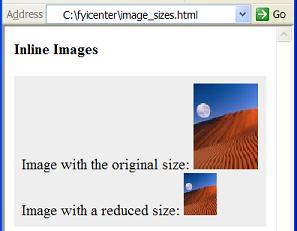
How To Reduce the Display Size of an Image? - XHTML 1.0 Tutorials - Understanding Inline Images and Image Maps If an image embedded inline is too big when displayed in a browser, you can use "width" and "height" attributes to reduce the image's display size. The display width and height should be pr...
2007-05-12, 5642👍, 0💬

What Is an OPTION Tag/Element
What Is an OPTION Tag/Element? - XHTML 1.0 Tutorials - Understanding Forms and Input Fields A "option" element is an inline element that you can use to define one option of a dropdown input field in a form. Here are basic rules about a "option" element: "option" elements are inline elements. "option...
2007-05-12, 5635👍, 0💬

What Are Hyper Links
What Are Hyper Links? - XHTML 1.0 Tutorials - Understanding Hyper Links and URLs A hyper link is a special text in an XHTML document defined with a hidden link to another resource on the Internet. While viewing the XHTML document, you can click the hyper link, the browser will follow the hidden link...
2007-05-12, 5632👍, 0💬

How To Enter Comments into XHTML documents
How To Enter Comments into XHTML documents? - XHTML Tutorials - Introduction To Tag and Attribute Syntax If you want to enter comments into an XHTML document, you can use the comment tag: "&lt;!-- ... --&gt;". Here are some good examples of XHTML comments: &lt;!-- Start north banner --&a...
2007-05-12, 5621👍, 0💬

How To Closing an XHTML Element
How To Closing an XHTML Element? - XHTML Tutorials - Introduction To Tag and Attribute Syntax Every XHTML element must be closed. There are two ways to close an XHTML element: Using a closing tag, which is the element name prefixed with "/" and enclosed in a pair of angle brackets: "&lt;" and "&...
2007-05-12, 5604👍, 0💬

What Is a SELECT Tag/Element
What Is a SELECT Tag/Element? - XHTML 1.0 Tutorials - Understanding Forms and Input Fields A "select" element is an inline element that you can use to define a dropdown input field in a form. Here are basic rules about a "select" element: "select" elements are inline elements. "select" elements can ...
2007-05-12, 5577👍, 0💬

How To Define a Hyper Link
How To Define a Hyper Link? - XHTML 1.0 Tutorials - Understanding Hyper Links and URLs If you want to define a hyper link in your XHTML document, you need to use an "a" element with the "href" attribute. Here are basic rules about defining a hyper link with "a" element: An "a" element with the "href...
2007-05-12, 5573👍, 0💬

What Happens If a Hyper Link Points to a ZIP File
What Happens If a Hyper Link Points to a ZIP File? - XHTML 1.0 Tutorials - Understanding Hyper Links and URLs If you want to build a hyper link to allow visitors to access a ZIP file by clicking a hyper link, you can put the URL of the ZIP file directly in the "href" attribute of the hyper link. If ...
2007-05-12, 5538👍, 0💬

What Is a White Space Character
What Is a White Space Character? - XHTML Tutorials - Introduction To Element Content Syntax A white space character is a character that leaves nothing on your screen. There are 4 known white space characters: " " - The space character. "\t" - The tab character. "\n" - The new line character. "\r" - ...
2007-05-12, 5526👍, 0💬

What Are Predefined Attribute Values
What Are Predefined Attribute Values? - XHTML Tutorials - Introduction To Tag and Attribute Syntax Some XHTML attributes have predefined values. If an attribute has predefined values, you must use one of the predefined values. For example, attribute "valign" of element "td" has 4 predefined values "...
2007-05-12, 5517👍, 0💬

What Are the XHTML Elements Defined with EMPTY Contents
What Are the XHTML Elements Defined with EMPTY Contents? - XHTML Tutorials - Introduction To Element Content Syntax The following XHTML elements are defined to use the EMPTY content model: &lt;meta ... /&gt; - Element to provide meta data to the document. &lt;link ... /&gt; - Element...
2007-05-12, 5503👍, 0💬

What Is a TEXTAREA Tag/Element
What Is a TEXTAREA Tag/Element? - XHTML 1.0 Tutorials - Understanding Forms and Input Fields A "textarea" element is an inline element that you can use to define a large input area in a form. Here are basic rules about a "textarea" element: "textarea" elements are inline elements. "textarea" element...
2007-05-12, 5493👍, 0💬

< 1 2 3 4 5 6 7 > >>   Sort: Date