Explain simple Walk through of XmlReader
Explain simple Walk through of XmlReader ?
✍: Guest
In this section we will do a simple walkthrough of how to use the “XmlReader” class.
Sample for the same is available in both languages (C# and VB.NET) which you can find
in “WindowsApplicationXMLVBNET” and “WindowsApplicationCSharp” folders. Task
is to load “TestingXML.XML” file and display its data in a message box. You can find
“TestingXML.XML” file in “BIN” directory of both the folders. Below is the display of
“TestingXML.XML” file and its content.
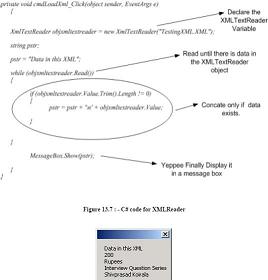
Both the projects have command button “CmdLoadXML” which has the logic to load the
XML file and display the data in messagebox. I have pasted only the “CmdLoadXML”
command button logic for simplicity. Following are the basic steps done:
Declared the “XMLTextReader” object and gave the XML filename to load the
XML data.
Read the “XMLTextReader” object until it has data and concatenate the data in a
temporary string.
Finally display the same in a message box.

Same holds true for C# code as shown below.
2007-10-31, 9055👍, 0💬
Related Topics:


