How To Reduce the Display Size of an Image
Q
How To Reduce the Display Size of an Image? - XHTML 1.0 Tutorials - Understanding Inline Images and Image Maps
✍: FYIcenter.com
A
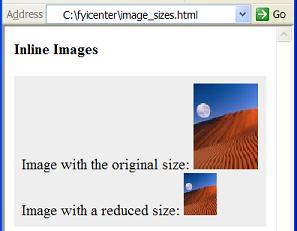
If an image embedded inline is too big when displayed in a browser, you can use "width" and "height" attributes to reduce the image's display size. The display width and height should be proportional to the actual width and height of the image. Otherwise, the image will be displayed with a distortion.
Here is a tutorial example of images with reduced sizes:
<?xml version="1.0" ?>
<!DOCTYPE html PUBLIC "-//W3C//DTD XHTML 1.0 Strict//EN"
  "http://www.w3.org/TR/xhtml1/DTD/xhtml1-strict.dtd">
<html>
 <head>
  <title>Image Sizes</title>
 </head>
 <body>
  <h4>Inline Images</h4>
  <p style="background-color: #eeeeee; padding: 8px;">
   Image with the original size:
   <img src="/moonrise.jpg"" alt="Moonrise"
    width="69" height="91"/><br/>
   Image with a reduced size:
   <img src="/moonrise.jpg"" alt="Moonrise"
    width="35" height="45"/></p>
 </body>
</html>
If you save the above document as image_sizes.html, and view it with
Internet Explorer, you will see that the same image is displayed with
two sizes as shown below:
2007-05-12, 5285👍, 0💬
Related Topics: