How To Tell Web Browsers That Your Web Pages Have Atom Feeds
How To Tell Web Browsers That Your Web Pages Have Atom Feeds? - RSS FAQs - Atom Feed Introduction and File Generation
✍: FYIcenter.com

One way to tell Web browsers that your Web pages have Atom Feed files is to add a "link" tag in the header section of your Web pages. The "link" tag defines a "link" element with 4 attributes:
- rel="alternate" - Defines the relation of this Web page and the Atom feed file.
- type="application/atom+xml" - Defines the MIME type of the Atom feed file.
- href="/urlOfAtomFeedFile" - Defines the location of the Atom feed file.
- title="titleOfTheFeed" - Defines the title of the Atom feed file.
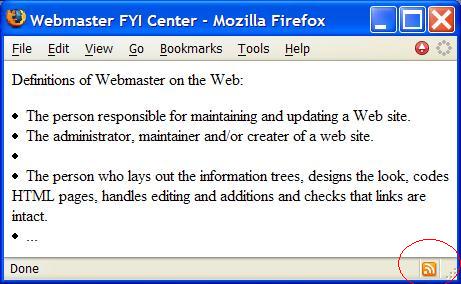
The following Web page contains a "link" tag good example that associate an Atom feed to this page:
<html><head>
 <title>Webmaster FYI Center</title>
 <link rel="alternate" type="application/atom+xml"
  href="/atom.xml" title="Atom feed for FAQ pages">
</head><body>
<p>Definitions of Webmaster on the Web:</p>
<li>The person responsible for maintaining and
    updating a Web site.</li>
<li>The administrator, maintainer and/or creater
    of a web site.<li>
<li>The person who lays out the information trees,
    designs the look, codes HTML pages, handles editing
    and additions and checks that links are intact.</li>
<li>...</li>
</ul>
</body></html>
You need to name this file as "webmaster.html" and uploaded it to your Web site. You also need to upload the "atom.xml" created in previous tutorials. Now smart Web browsers should be able to know that "webmaster.html" has an Atom feed named as "atom.xml".
2007-05-12, 5827👍, 0💬
Related Topics: