Hot To Specify the Content Box Size of a Block Element
Q
Hot To Specify the Content Box Size of a Block Element? - CSS Tutorials - HTML Formatting Model: Block, Inline and Floating Elements
✍: FYIcenter.com
A
If you want to control the size of the content box of a block element, you can use the "width" and "height" properties as shown below:
- {width: 300px} - Specifies the content box to be 300px wide.
- {height: 200px} - Specifies the content box to be 200px high.
The HTML and CSS document below shows you a good example of how to specify content box size of on a <P> tag:
<html><head>
<style type="text/css">
  H1 {font-size: 20px}
  DIV.page {width: 425px; border: 1px solid black}
  TABLE#out {background-color: #ffdddd}
  TD#box {border: 1px solid black}
  P#box {width: 300px; height: 200px;
    background-color: #ddddff}
  TD.legend {height: 29px; background-color: #ffffff}
  TD.legend#content {height: 200px}
</style>
</head><body><div class="page">
<H1>Content Box Width and Height</H1>
<table id=out><tr>
<td id=box><p id=box><script language="JavaScript">
  for (i=0; i<10; i++) {
    for (j=0; j<10; j++) {
      document.write(j+' ');
    }
  }
</script></p></td>
<td><table>
<tr><td class=legend id=content>- Content box</td></tr>
</table></td>
</tr></table>
<p align="right">By FYICenter.com</p>
<div></body></html>
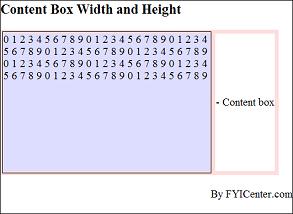
Save this document as contentBox.html, and view it with a browser,
you should see the content box being formatted as 300x200 pixels as shown below:
2007-05-11, 5129👍, 0💬
Related Topics: